This article is written in Indian English and intended for readers in India.
A Windows 7 ISO file is an exact digital copy of the Windows 7 installation DVD or disc, saved in the ISO image format (.iso). It is essential for installing Windows 7 on a PC or virtual machine, and for creating a bootable USB drive.
In this article, you will find direct links for official Windows 7 ISO downloads in 64-bit, 32-bit, and all-in-one editions. All sources provided are secure and legally safe, allowing you to download with confidence. Additionally, guidance on creating a Windows 7 bootable USB is included.
Need Windows 7 Pro ISO? Access directly from: Windows 7 Pro ISO Download | Windows 7 Home ISO Download
Or obtain other Windows ISO files from this database: Windows ISO Download.
Windows 7 ISO file download 64-bit (x64)
The 64-bit version of Windows 7 is designed for modern PCs with 64-bit processors.
Below are download links for commonly used 64-bit editions: Windows 7 Home Premium, Windows 7 Professional, and Windows 7 Ultimate, all in English.
Download Windows 7 Home Premium 64-bit ISO (3.0 GB)
MD5: DA319B5826162829C436306BEBEA7F0F
SHA-1: 6C9058389C1E2E5122B7C933275F963EDF1C07B9
Source: softcomputers.org
Download Windows 7 Pro 64-bit ISO (3.0 GB)
MD5: 3c394e66c208cfd641b976de10fe90b5
SHA-1: 708e0338d4e2f094dfeb860347c84a6ed9e91d0c
Source: archive.org
#Original x64 MSDN ISO file
Download Windows 7 Ultimate 64-bit ISO (3.0 GB)
MD5: f43d22e4fb07bf617d573acd8785c028
SHA-1: 326327cc2ff9f05379f5058c41be6bc5e004baa7
Source: archive.org
#Original x64 MSDN ISO file
Note: After downloading, copy the MD5 and SHA-1 hash values for the ISO file and use a verification tool such as Windows' built-in certutil to ensure the downloaded ISO is intact and unmodified.
Once the Windows 7 ISO is downloaded, confirm system requirements before installation or creating a bootable USB.
System Requirements for Windows 7 ISO 64-bit
| Processor (CPU) | 1 GHz or faster, 64-bit (x64) |
| RAM (range) | Home Premium: 2 GB - 16 GB Professional & Ultimate: 2 GB - 192 GB |
| Application Compatibility | Runs 32-bit & 64-bit applications |
| Minimum installation storage | 20 GB |
| Graphics Requirements | Base: DirectX 9-capable GPU with WDDM 1.0 driver Aero Glass: 128 MB GPU memory, Pixel Shader 2.0, Windows Experience Index ≥ 3.0 |
| Minimum display resolution | 800 × 600 pixels |
| Firmware Support | BIOS or UEFI (Secure Boot supported but not mandatory) |
Feel free to share the Windows 7 ISO 64-bit download links and system requirements with others.
Windows 7 ISO file download 32-bit (x86)
The 32-bit edition of Windows 7 ISO is intended for 32-bit processors (x86 architecture), though it can also run on 64-bit CPUs in 32-bit mode. It is compatible with older PCs from 2000–2010 featuring 32-bit processors.
Click the links below to download Windows 7 ISO 32-bit freely, covering Home Premium, Professional, and Ultimate editions.
Download Windows 7 Home Premium 32-bit (x86) ISO (2.3 GB)
MD5: 0AFA9359C62DC7B320205D3863C60385
SHA-1: 6071B4553FCF0EA53D589A846B5AE76743DD68FC
Source: softcomputers.org
Download Windows 7 Pro 32-bit (x86) ISO (2.3 GB)
MD5: f55d3916622dd4125be6336876559690
SHA-1: d5bd65e1b326d728f4fd146878ee0d9a3da85075
Source: archive.org
#Original x86 MSDN ISO file
Download Windows 7 Ultimate 32-bit (x86) ISO (2.3 GB)
MD5: d0b8b407e8a3d4b75ee9c10147266b89
SHA-1: 5395dc4b38f7bdb1e005ff414deedfdb16dbf610
Source: archive.org
#Original x86 MSDN ISO file
Note: After downloading, save the MD5 and SHA-1 hash values and use a verification utility, such as certutil on Windows, to ensure the ISO file is intact and unaltered.
It is recommended to check the system requirements of Windows 7 ISO 32-bit before a clean installation or creating a bootable USB.
System requirements for Windows 7 ISO 32-bit
| Processor (CPU) | 1 GHz or faster (x86), 32-bit (64-bit CPUs can run it in 32-bit mode) |
| RAM (range) | 1 GB - 4 GB |
| Application compatibility | 32-bit applications |
| Minimum installation storage | 16 GB |
| Graphics requirements | DirectX 9-capable GPU with WDDM 1.0 driver (needed for Aero) |
| Minimum display resolution | 800 × 600 pixels |
| Firmware support | BIOS or UEFI (Secure Boot supported but not mandatory) |
Share these 32-bit Windows 7 ISO resources with others to help them access these files.
Windows 7 All-in-One DVD ISO download for free
The Windows 7 All-in-One DVD ISO is a complete copy of a DVD consolidated into a single file. It includes multiple editions: Starter, Home Premium, Professional, and Ultimate.
Use the links below to access Windows 7 All-in-One (AIO) DVD freely:
Download Windows 7 All-in-One DVD ISO file (3.8 GB)
MD5 Checksum: 4a956d4266d8c925accd145f1613e41d
#Includes all editions in 32-bit and 64-bit
Download Windows 7 All-in-One DVD ISO file (4.3 GB)
This ISO contains all updates for each edition.
#All-in-One SP1 with updates included
How to create a Windows 7 bootable USB
Microsoft previously offered the USB/DVD Download Tool for creating Windows 7 bootable USBs, but it is no longer available. Many now use Rufus, but it is open-source, which may pose security concerns, and the setup can be tricky.
An easier option is iBoysoft DiskGeeker for Windows. This versatile Windows disk manager enables creating a Windows 7 bootable USB installer in just a few clicks, making it fast and reliable.
Steps for creating a Windows 7 bootable USB installer
- Download iBoysoft DiskGeeker for Windows, install and launch it on your PC.
- Connect a USB drive with at least 32 GB free space.
- In the "Download and create boot disk" section, click "Windows" > "Create Windows OS USB Installer."
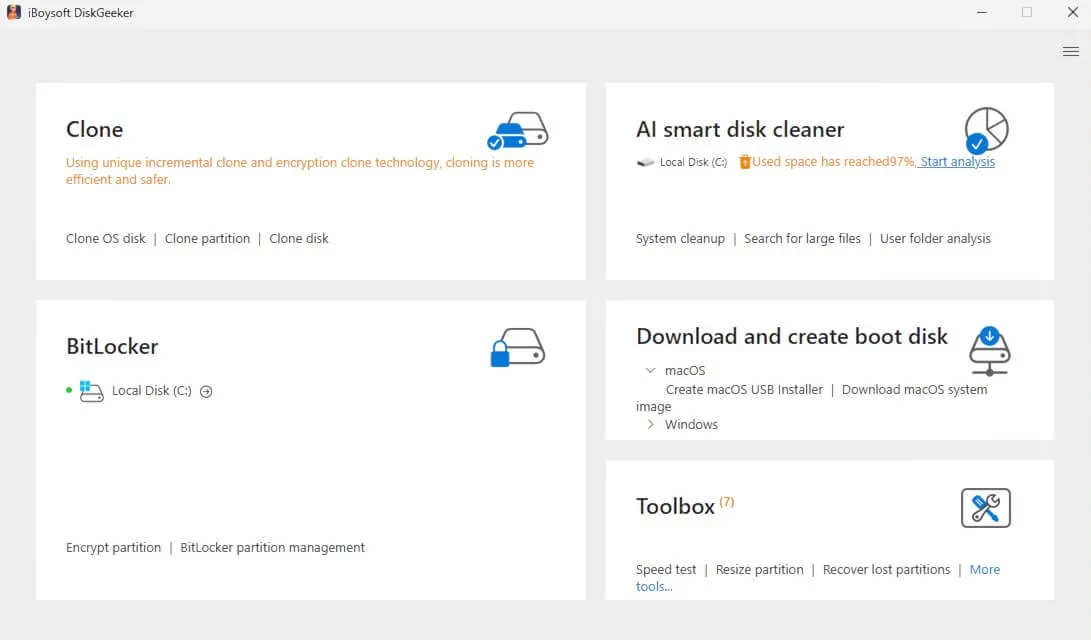
- Select your USB drive as the target disk and click "Select".
- Pick Windows 7 and click "Start creating boot disk" > "Yes".
DiskGeeker will download the ISO and create the bootable USB automatically.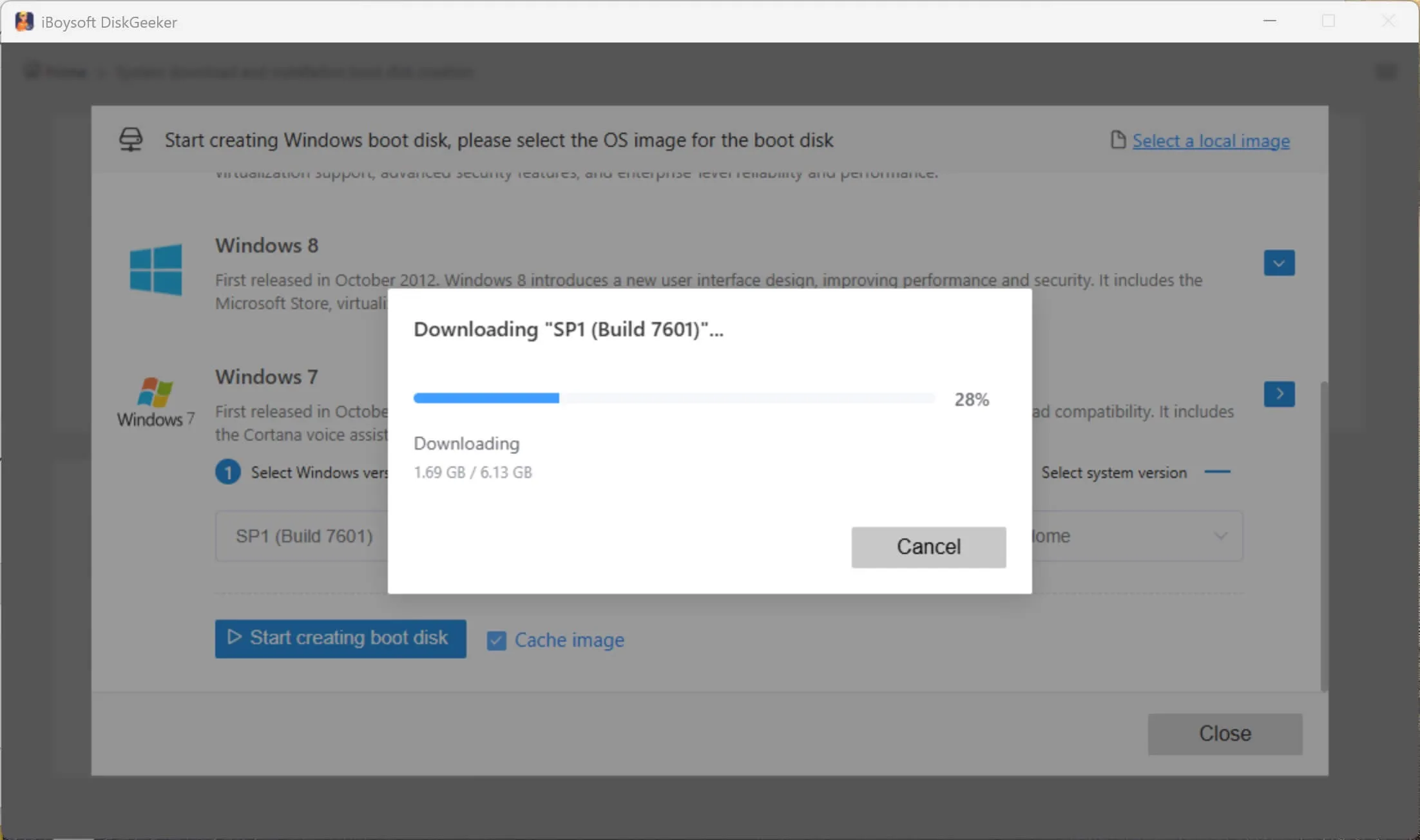
To boot a PC using the Windows 7 bootable USB:
- Attach the bootable USB to the target PC.
- Restart the PC while holding the Boot Menu key (varies by manufacturer) to enter Boot Menu or BIOS/UEFI.
HP: F9 or Esc
Dell: F12
Lenovo: F12
Acer: F12
ASUS: Esc or F8
MSI: F11 - Choose the USB drive as the boot device.
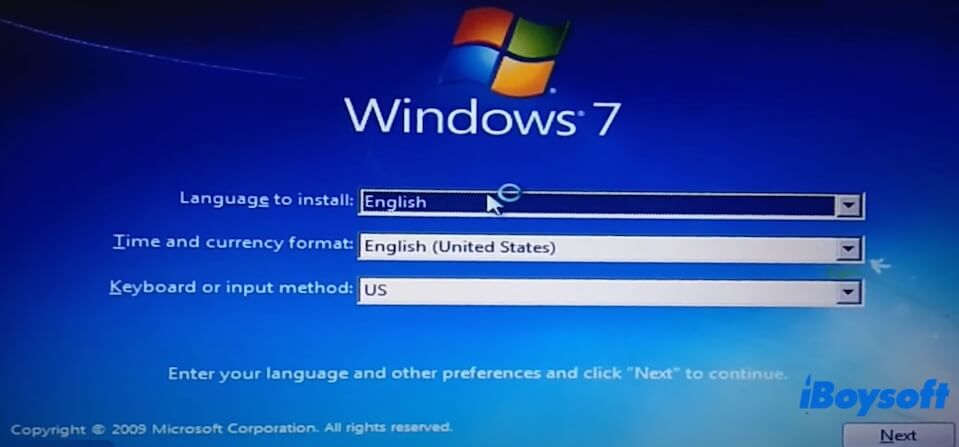
If Boot Menu is inaccessible, enter BIOS/UEFI and set USB as first in boot priority. - The PC will start from the USB. Follow on-screen instructions to install Windows 7.
Clone Windows 7 PC to create a bootable copy
This Windows disk manager also allows cloning a Windows 7 system partition to make a bootable copy.
Unlike a bootable USB installer, this bootable copy can directly run Windows 7 from an external drive without installation.
It is ideal for booting non-starting computers or testing Windows 7 on different PCs with the same configuration.
- Download, install, and open iBoysoft DiskGeeker for Windows.
- Connect a USB drive to the Windows 7 machine.
Note: The USB must have sufficient storage for the system partition. - The Source OS disk section will show the system partition. Select it.
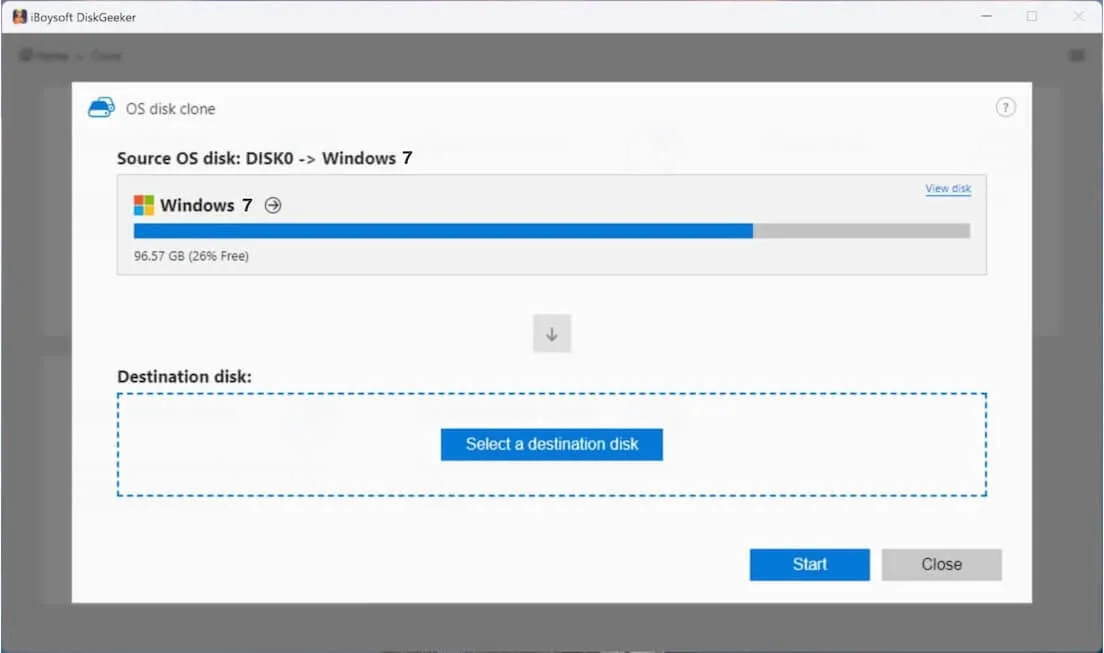
- Click "Select a destination disk" and choose the USB drive.
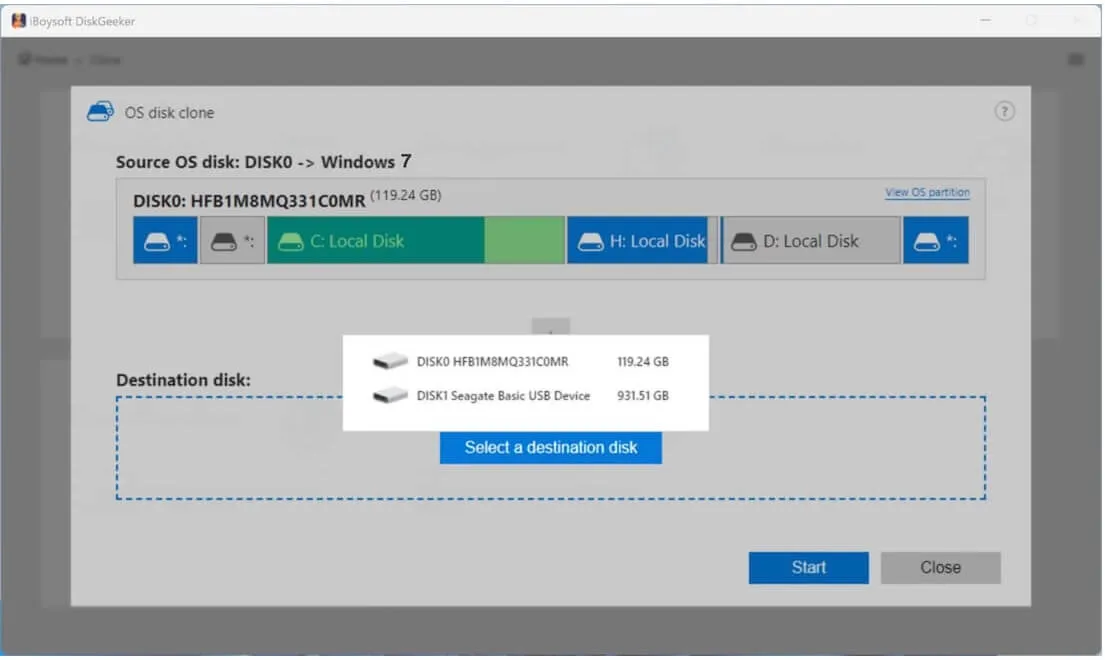
- Click "Start" > "Confirm" to begin the cloning process.
You can now boot a PC directly from this cloned copy of Windows 7.
Share these ISO download links to help others access Windows 7.
FAQs about Windows 7 ISO download
- QCan I still download Windows 7 ISO?
-
A
Yes, you can still download Windows 7 ISO. Microsoft won't sell or actively support Windows 7 for general consumers. However, if you have a valid Windows 7 product key, Microsoft still provides Windows 7 ISO downloads for you.
Otherwise, you need to download the Windows 7 ISO file from third-party sites like archive.org.
- QHow to download Windows 7 Pro ISO?
-
A
You can follow the direct link from archive.org to get the Windows 7 Pro ISO.
- QHow to download Windows 7 Ultimate 64-bit ISO file?
-
A
If you have a genuine Windows 7 Ultimate product key, you can get the Windows 7 Ultimate 64-bit ISO file from the official Microsoft page. Otherwise, you can only download the Windows 7 Ultimate 64-bit ISO file from third-party resources.
- QHow to download Windows 7 ISO for free?
-
A
You can download Windows 7 ISO for free from the archive.org.